How I upgraded my home lab from Nginx to Caddy
The tech stack update path for my home lab
I have a registered domain with Cloudflare — the blog you’re reading right now is just one of the sites running on it. I also host a password manager, Vaultwarden ↗, behind a WAF.
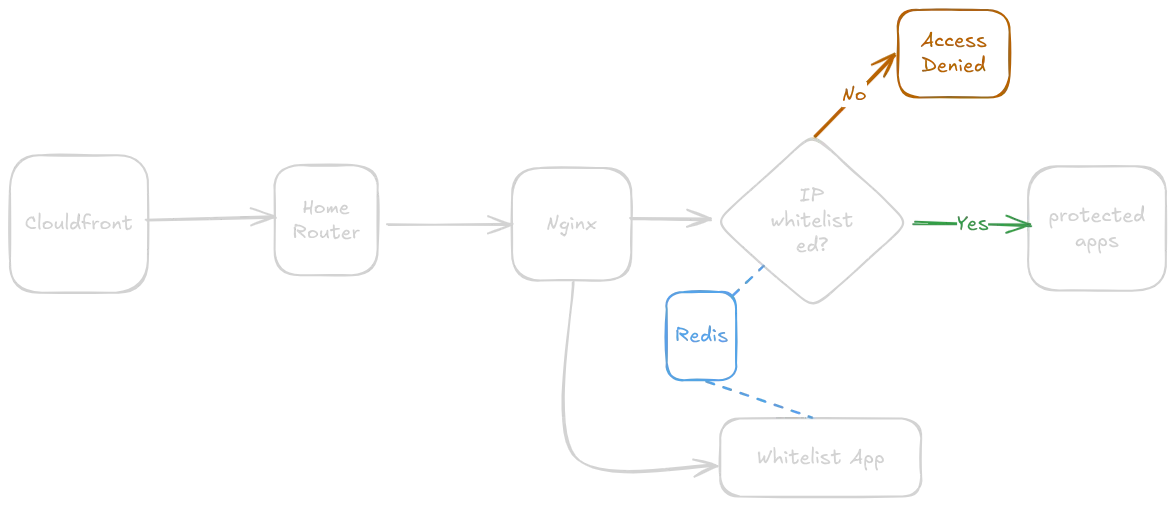
When I first set up my home lab, I used Nginx as the middleman between Cloudflare and my applications, with Let’s Encrypt handling SSL. For extra protection, I ran a Redis server to dynamically manage a whitelist of allowed IPs — only requests from those IPs could reach protected sites like Vaultwarden or the Nextcloud instance I share with my family. I built a SvelteKit app (publicly accessible) to manage the whitelist, with authentication handled by Pocketbase ↗. The actual WAF check happened inside Nginx via the Redis Lua module.
It worked, but it had a few pain points:
- Every single request to a protected site triggered an IP whitelist lookup1
- Caching helped with performance, but introduced a lag — a newly whitelisted IP could take up to 10 seconds to be recognized
- Wildcard SSL certificate from Let’s Encrypt needs manual renewal every 3 months
Here’s the architecture diagram of that original setup:
Then I came across Caddy. I read a post from someone who’d migrated their entire stack from Nginx to Caddy, got curious, and started experimenting a few weeks ago. I followed this Youtube tutorial2 and was honestly blown away — automatic SSL certificate renewal alone made it worth the switch.
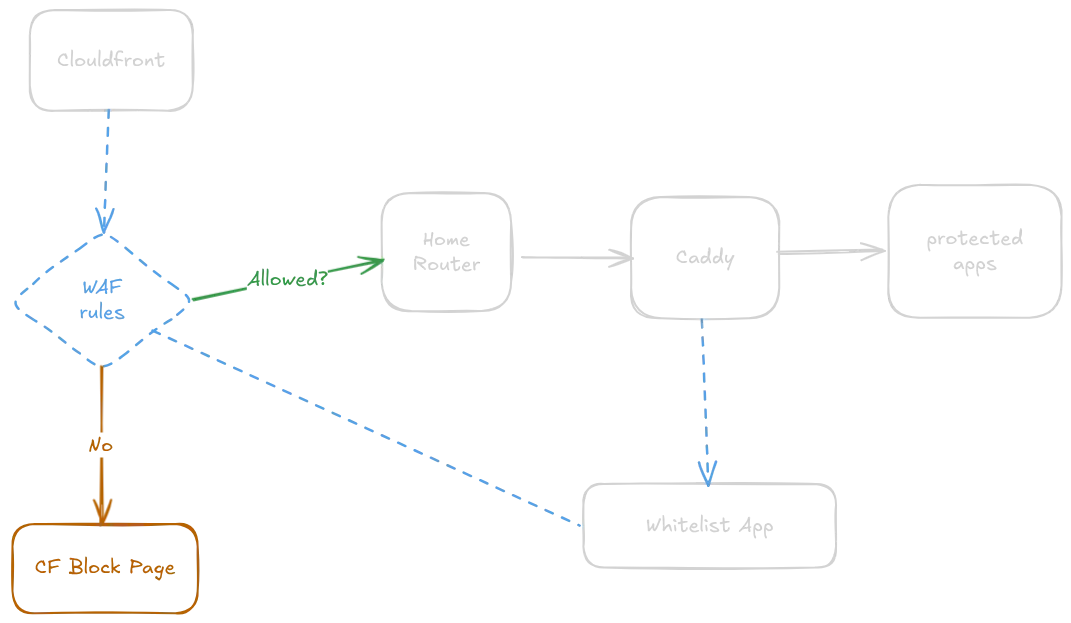
I also found a much cleaner approach to IP whitelisting. Instead of checking IPs inside my home lab on every request, I moved that logic to Cloudflare, managing the whitelist via their [list items API]:
PUT https://api.cloudflare.com/client/v4/accounts/{account_id}/rules/lists/{list_id}/itemsA local SQLite database (used by the better-auth library) keeps track of the listed IPs on my end. The big win here: disallowed requests to the protected apps never even reach my home router.
Here’s what the new stack looks like:
The original Excalidraw file for both diagrams is here ↗.